
Supported Formats
The canonical catalog registers 275 file extensions across 47 preview pipelines: 225 stable and 50 experimental.
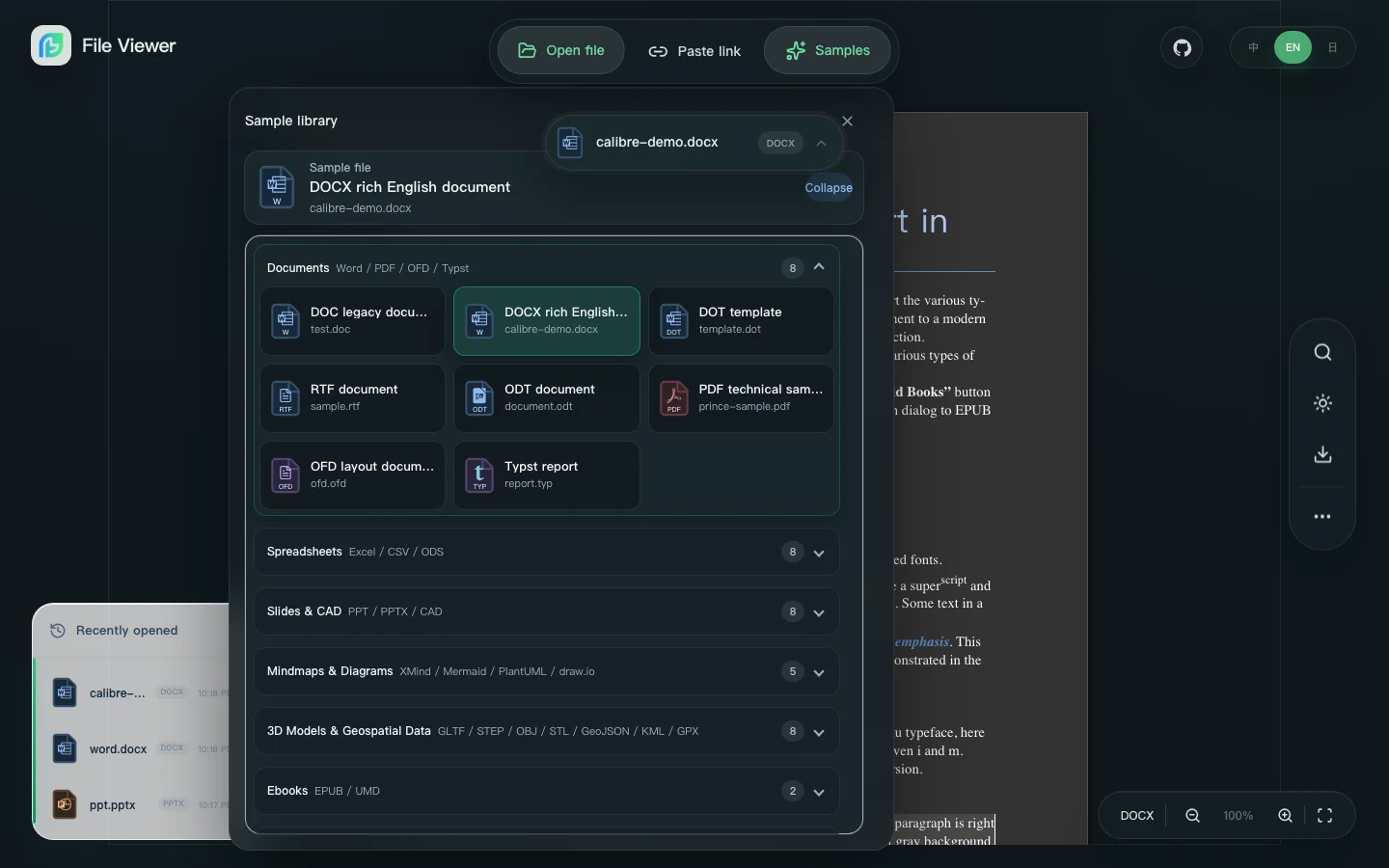
The demo groups representative samples for all 47 preview pipelines. Stable rows require redistributable real-file fixtures and browser assertions; synthetic or renamed fixtures never count as evidence. Experimental rows keep their limits visible.
Main Preview Pipelines
| Category | Examples |
|---|---|
| Word | docx, docm, dotx, dotm, legacy doc, dot, RTF/ODT; structured stable wpd, wp, wp5, wp6, hwp, hwpx |
| Spreadsheets | xlsx, xlsm, xlsb, xls, xla, xlam, csv, tsv, ods, fods, dbf; stable high-fidelity numbers |
| Presentations | binary ppt, pot; OpenXML pptx, pptm, potx, potm, ppsx, ppsm; OpenDocument odp; stable high-fidelity key |
| Apple documents | stable high-fidelity pages, numbers, and key with iWork '09 XML/APXL and modern Snappy/IWA parser paths |
| Layout documents | pdf, ofd, typ, typst |
| Archives | zip, 7z, rar, tar, gz, tgz, cab, iso, apk, cbz, cbr, and more |
eml, msg, mbox | |
| Medical images (explicit opt-in) | dcm, dicom through @file-viewer/renderer-dicom; one bounded local Part 10 file, including multi-frame navigation |
| Digital signatures (explicit opt-in) | p7m, p7s, p7b, p7c, pkcs7, cms, cmsc, tsq, tsr, tst, tsd, asics, scs, asice, sce, ers, asc, sig, pgp, gpg, jws through @file-viewer/renderer-signature |
| Binary inspection (explicit opt-in) | bin, hex, elf, exe, dll, class, macho through @file-viewer/renderer-binary; a bounded, read-only byte inspector with no MIME wildcard or specialist-route override |
| Diagrams and mind maps | xmind, drawio, dio, excalidraw, mermaid, mmd, plantuml, puml |
| CAD and engineering | dwg, dxf, dwf, dwfx, xps, plus EDA files such as gds, oas, oasis, olb, dra |
| 3D and geospatial | gltf, glb, obj, stl, ply, step, stp, iges, ifc, 3dm, brep, geojson, kml, gpx, shp; opt-in /geo3d: las, laz, copc, GeoTIFF/COG, CityJSON, 3D Tiles, 3tz |
| Text, code, and data | Markdown, source code, logs, JSON, YAML, TOML, SQL, IPYNB, SQLite, WASM, Parquet, Avro |
| Adobe design files (explicit opt-in) | psd, psb, pdd, psdt, ai, ait, eps, ps, idml, icml, idms, inx, xd, indd, indt, fla, xfl, ase, aco, abr, csh, pat, grd, asl through @file-viewer/renderer-design |
| Media and assets | Images, SVG, HEIC, audio, video, HLS, and fonts |
Office and Apple evidence boundary
xla,xlam,pot,dbf, andfb2have real container fixtures, parser assertions, hashes, and Demo smoke cases. Macro and add-in code is never executed.pages,numbers, andkeyinclude iWork '09 and modern IWA parser fixtures, bounded ZIP/Snappy/Protobuf parsing in a module Worker, a normalized static scene model, search/text layers, sheet/slide navigation, notes, and explicit encrypted-file detection.pages,numbers, andkeyare high-fidelity / stable. The gate covers iWork '09, 2013+, and current Apple 15.3.1 native containers with exact structural assertions, real-browser smoke, and fixed-font visual goldens. Pages/Keynote use a 3% pixel-difference threshold and Numbers uses 5%; Quick Look images remain loading placeholders or explicit limited-preview fallbacks only.- Stable Apple support means static high fidelity: Keynote animations, transitions, and video are not executed; Numbers reads saved formula results instead of recalculating them; encrypted
iwpv2files are detected and reported; missing fonts surface substitution information. wpd/wp/wp5/wp6are structured / stable. A checksum-pinned MPL-2.0 libwpd/librevenge WebAssembly Worker extracts text, styles, tables, headers, footers, and notes from licensed genuine WP 4.2, 5.0, 5.1, and 6.x fixtures. Chromium, Firefox, and WebKit smoke the packaged Worker/WASM path;wp5andwp6remain routing aliases and renamed files do not count as fixture evidence. Macros are never executed, and bounded text is only a runtime fallback.- The binary inspector is experimental and explicit. It owns only seven binary-oriented extensions, parses a reviewed header catalog in a terminable module Worker, and shows raw bytes when no template matches. PNG, ZIP, WASM,
application/octet-stream, editing, and user-authored templates are intentionally outside its routing contract. hwp/hwpxare structured / stable with redistributable Apache-2.0 HWP v5 and HWPX fixtures. The gate covers page geometry, inline styles, merged tables, headers, footers, notes, and embedded images in Chromium, Firefox, and WebKit. Encrypted, DRM, and distribution documents are detected and rejected explicitly; rare controls and producer-specific layout constructs remain documented limitations.
The full machine-readable matrix, including containers, levels, status, and limits, is generated from ecosystem/format-catalog.json into docs/generated/format-catalog.md.
Engineering Renderer Notes
- Adobe creative files use the explicit
@file-viewer/renderer-designpackage. Local module Workers and WASM keep parsing off the main thread and make the path fully self-hostable. Fidelity follows the evidence available in each format: saved PSD/PSB composites and supported layer pixels; a verified PDF-compatible Illustrator surface by default; native AI/AIT PGF/private-source artboards, layers, paths, and bounded Canvas rendering throughillustrator-pgf; IDML pages; structured InDesign exchange/modern XFL; embedded XD/INDD previews; deterministic resource previews; and experimental PostScript output. Unknown native Illustrator operators remain visible in fidelity diagnostics instead of being discarded, and unsupported gradients, complex text, images, plugins, effects, masks, blending, overprint, and color-management semantics are not claimed as complete reconstruction. - Word preview uses
@file-viewer/renderer-word. The package lazy-loads@file-viewer/docx,@file-viewer/doc, and RTF/OpenDocument helpers only for DOCX/DOC/RTF/ODT files, so core-only and lightweight component installs do not pull Word engines by default.msdoc-vieweris a compatibility alias for@file-viewer/doc, not a separate parser. - Legacy DOC keeps separate Latin, East Asian and bidirectional font settings and distinguishes single/multiple, minimum and exact line spacing. Fonts come from the browser's installed fonts and fallbacks, not a public CDN; different installed fonts can still change glyphs and wrapping. The Demo includes the original WPS sales-contract sample. That file contains no tracked revisions, so it must not display invented deletion marks.
- DOCX Worker auto mode requires a known
options.docx.workerUrl, browser Worker support and a safe page protocol. Full packages supply the asset URL; a lightweight integration without it parses on the main thread rather than requesting a missing Worker. Explicitworker: trueremains available with correctly deployed assets. - Spreadsheet preview uses
@file-viewer/renderer-spreadsheetwithstyled-exceljsande-virt-table. It preserves Office 365 and WPS in-cell images alongside workbook drawing images; double-clicking a rendered image opens a full-size preview that can be dismissed with Escape, the backdrop, or the close button. - Presentation preview uses
@file-viewer/renderer-presentationwith two isolated engines. Binary PowerPoint 97–2003.pptlazy-loads the packaged@file-viewer/[email protected]TypeScript parsing Worker and main-thread SVG/Canvas rendering; OpenXML files lazy-load@file-viewer/pptxand its separate Worker. Standard Demo, Vite/full, copy-assets, and CDN/IIFE layouts need no PPT runtime URL configuration; useoptions.presentation.pptModuleUrl/pptWorkerUrlonly for custom.pptasset layouts andworkerUrl/workerTypefor PPTX. - XMind uses
@file-viewer/renderer-mindmapwith XMind 8 XML and XMind 2020+ JSON package parsing, plus an@panzoom/panzoompowered canvas for drag panning, node-start dragging, mobile pinch zoom, keyboard panning, responsive fit-on-open/host-resize behavior, and unified toolbar state sync after pan/navigation. - Mermaid and PlantUML are handled by
@file-viewer/renderer-drawing. Mermaid lazy-loads the officialmermaidrenderer and outputs theme-aware SVG. PlantUML stays offline by default with an SVG source preview; configureoptions.drawing.plantumlServerUrlwhen an intranet PlantUML SVG service is available. If the endpoint is unavailable, the viewer renders the same offline preview instead of leaving the page blank. Both diagram surfaces support drag panning and renderer-native zoom controls through@panzoom/panzoom. - Patch files are rendered with
diff2htmlin side-by-side mode. Git bundles parse the bundle header, refs, commit objects, trees, readable blobs, and regular OFS_DELTA / REF_DELTA pack objects directly in the browser; very large packs or bundles that depend on external prerequisites surface a clear boundary notice instead of being silently misrepresented. - EDA uses
@file-viewer/renderer-eda. OLB and DRA are safe structure previews over common CFB/OLE2 containers, standard GDSII renders small layouts as SVG and larger element sets through WebGL typed-array batches, readable OASIS text fixtures render as SVG, and real SEMI binary OASIS remains a safe structure-index preview until the dedicated WASM/WebGL layout kernel is split out. - CAD uses
@file-viewer/renderer-cadand@flyfish-dev/cad-viewer; DWG, DWF, and DWFx assets remain self-hostable for offline deployments. - Archives use
@file-viewer/renderer-archivewithlibarchive.jsWorker + WASM first, then ZIP/TAR/GZIP compatibility fallback when the Worker cannot start. Legacy ZIP files without the UTF-8 filename flag are decoded with GBK/GB18030 detection so Chinese entry names remain readable in the compatibility path. - Media uses
@file-viewer/renderer-mediaand native browser decoders first. When Chromium rejects an MPEG-4 Part 2 (mp4v) Simple Profile track, the renderer loads a dedicated Worker and the Apache-2.0 AOSP PacketVideo decoder. It uses the AAC track as the playback clock and draws decoded I420 frames to a Canvas. The WASM file is 111,379 bytes, or 34,410 bytes with gzip, and loads only after native decoding fails. The implementation contains no FFmpeg, libav, or LGPL/GPL/AGPL source. Files outside the decoder's current coverage get an explicit compatibility notice. - STEP, IGES, and BREP use the
@file-viewer/renderer-3dentry plus the lightweight@file-viewer/geometry-engineroute package and local OpenCascade/WASM decoding. The separate experimental@file-viewer/renderer-3d/ifcentry provides self-hosted That Open / Web-IFC preview when explicitly installed, as in the official Demo; it is not added to core, default component installs, or Full packages. 3DM remains signature and conversion guidance pending a dedicatedrhino3dmpath. - Streaming-first engineering/geospatial datasets use the explicit
@file-viewer/renderer-3d/geo3dsubpath. TIFF is content-sniffed so ordinary.tif/.tiffcontinues to use the image renderer; GeoTIFF/COG is routed only when geographic tags are present. COPC/COG/3D Tiles preserve random-access URLs, while 3TZ extraction is bounded and rejects unsafe archive paths.
Binary PPT Engine License Boundary
The compiled @file-viewer/[email protected] TypeScript runtime is distributed under its included Apache-2.0 license; the engine source remains private. Demo, Full, copy-assets, and CDN/IIFE outputs include its matching package and parsing Worker without native WASM or bundled fonts. Prior native releases retain their original license and watermark requirements.
Capability Model
Each renderer reports what it can safely do. The common toolbar then shows download, print, HTML export, zoom, search, and navigation only when the active file type supports those operations.
This avoids pretending that every format supports the same operations. Word and PDF can use full-page print adapters, images can zoom naturally, archives can lazy-extract nested entries, and virtual spreadsheet tables are provided by @file-viewer/renderer-spreadsheet to avoid fragile outer CSS scaling.
Best Evaluation Path
- Open the live demo.
- Try the sample closest to your production files.
- Test your own file through upload or URL.
- Use the comparison demo for contract, report, and generated-output review.
- If a standard-package deployment is offline or CSP-restricted, run
npx --yes file-viewer-copy-assets ./public/file-viewer; Full packages use their included same-versionnpx --no-install file-viewer-copy-assets ./public/file-viewer. Point renderer assets to your own static path.