# Demo Guide (/guide/demo)


<div className="doc-shot">
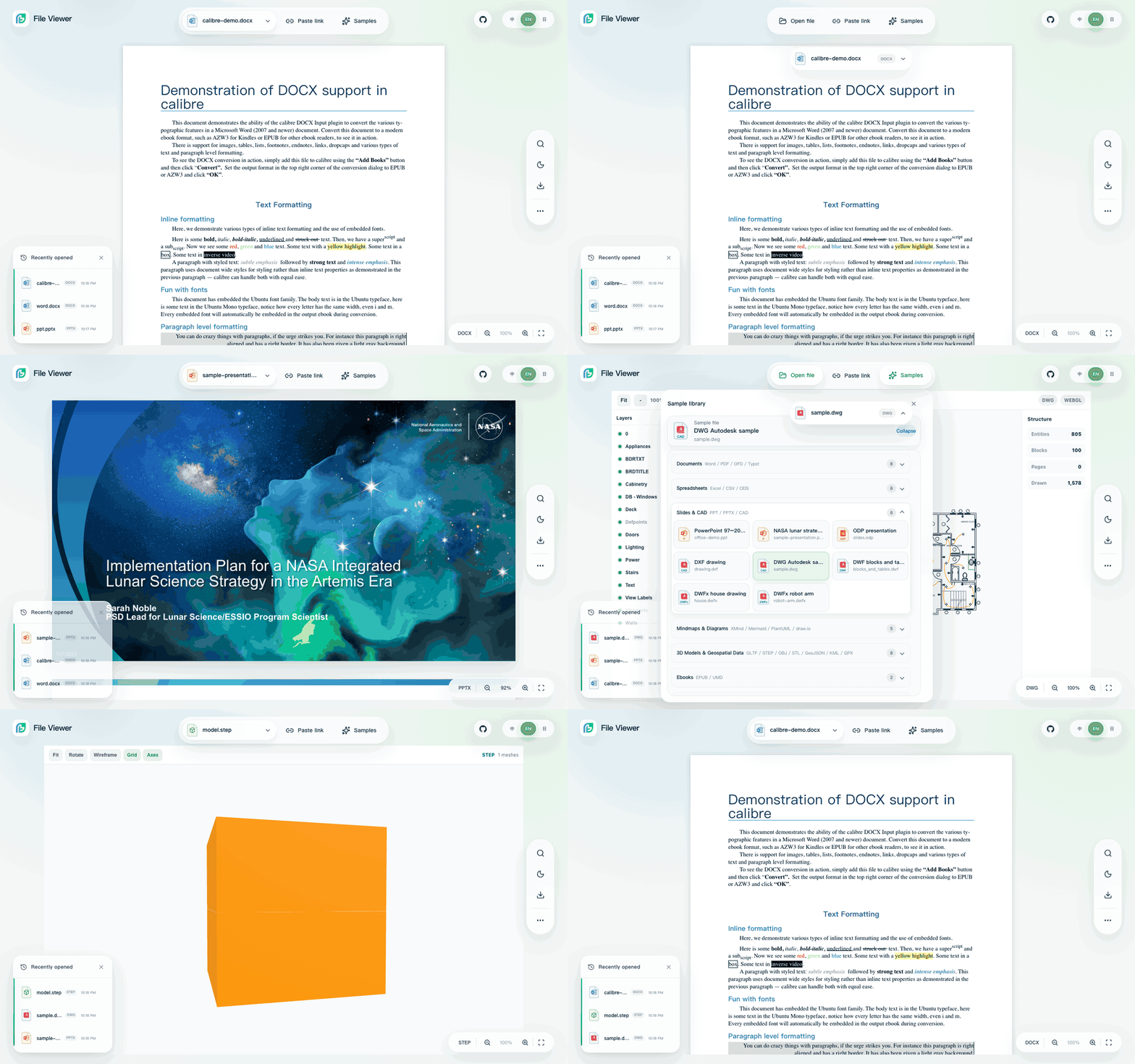
  <img src="/_media/file-viewer-demo-v2.2.6-formats-en.gif" alt="File Viewer by Flyfish v2.3.0 English demo showing DOCX, PPTX, DWG, interactive 3D STEP, and the file-capsule fusion" width="1200" height="750" loading="lazy" />

  <p className="doc-caption">
    The current workspace starts with a real DOCX, reveals the file capsule when the top controls are engaged, then opens the sample library and switches renderer pipelines.
  </p>
</div>

## Demo URLs [#demo-urls]

* Main demo: [demo.file-viewer.app](https://demo.file-viewer.app)
* iframe entry: [demo.file-viewer.app/iframe?url=/example/en/calibre-demo.docx](https://demo.file-viewer.app/iframe?url=/example/en/calibre-demo.docx)
* Document comparison: [demo.file-viewer.app/compare.html](https://demo.file-viewer.app/compare.html)
* Official portal: [file-viewer.app](https://file-viewer.app)

## What To Check [#what-to-check]

| Area             | What to verify                                                                                                                                                                                                                                                                                                     |
| ---------------- | ------------------------------------------------------------------------------------------------------------------------------------------------------------------------------------------------------------------------------------------------------------------------------------------------------------------ |
| Source controls  | Open file, Paste link, and Samples each open their own anchored panel instead of sharing one generic dialog                                                                                                                                                                                                        |
| File capsule     | The filename and correct format icon open the sample library; on desktop, the capsule separates on hover and flows back into the top bar one second after pointer leave                                                                                                                                            |
| Recent files     | URL and sample history persists in local storage, each item can be removed, and the compact history control restores the panel                                                                                                                                                                                     |
| Sample selector  | Files are grouped by type, collapsible, icon-led, and the active file group stays discoverable in light and dark themes                                                                                                                                                                                            |
| Toolbar          | Search, fit, theme, download, print, HTML export, watermark, zoom, navigation, and format-specific actions appear only when supported                                                                                                                                                                              |
| Settings         | More exposes the full option surface, including document-background mode, density, fit, watermark, archive, and current-format controls                                                                                                                                                                            |
| PDF              | Page thumbnails, outline tree, floating toolbar, fit-to-width, search highlights, and side panel toggling                                                                                                                                                                                                          |
| Word             | Stream-style document reading, correct text flow, printing without clipped first-page-only output                                                                                                                                                                                                                  |
| Spreadsheet      | Sheet tabs remain readable on desktop and mobile; optional column resize can be enabled                                                                                                                                                                                                                            |
| Image            | Open `multipage-ccitt-g4.tif` to verify two TIFF pages, group zoom/rotation/fit, page state, and double-click or keyboard lightbox access                                                                                                                                                                          |
| IFC              | Open either buildingSMART IFC4 fixture to verify the local Web-IFC import worker, canvas, Fit, selection, and property panel without a runtime CDN                                                                                                                                                                 |
| Binary inspector | Open the raw, PE, ELF, Mach-O, ZIP, WASM, PNG, and Java-class samples to verify the explicit read-only structure tree and virtualized byte rows                                                                                                                                                                    |
| Archive          | Nested entries preview through the same renderer registry, with safe metadata filtering, cache support, optional compact `ui.density:'compact'` spacing via `?density=compact`, and `archive.entryActions.download` checks for hiding nested entry downloads independently from the viewer-level original download |
| Mobile           | The filename stays centered, secondary controls collapse into one More action, only the document container scrolls, and heavy renderers remain lazy                                                                                                                                                                |

## Language-Aware Samples [#language-aware-samples]

The demo follows the browser language by default. Chinese browsers open the Chinese sample system; other languages open the English sample system. Use `?locale=zh-CN` or `?locale=en-US` for a stable locale; the historical `lang` parameter remains compatible.

The English demo uses public real-world samples for DOCX, PDF, PPTX, XLSX, and buildingSMART IFC4/IFC4.3, plus local lightweight fixtures for Markdown, text, logs, CSV, JSON, TypeScript, JavaScript, GeoJSON, glTF, binary inspection, and archive nesting. The Demo explicitly registers its optional IFC and binary renderers while keeping normal presets unchanged. All files and heavy Worker/WASM assets are served from the demo origin so enterprise intranet deployments do not depend on public CDNs at runtime.
<div className="doc-shot">
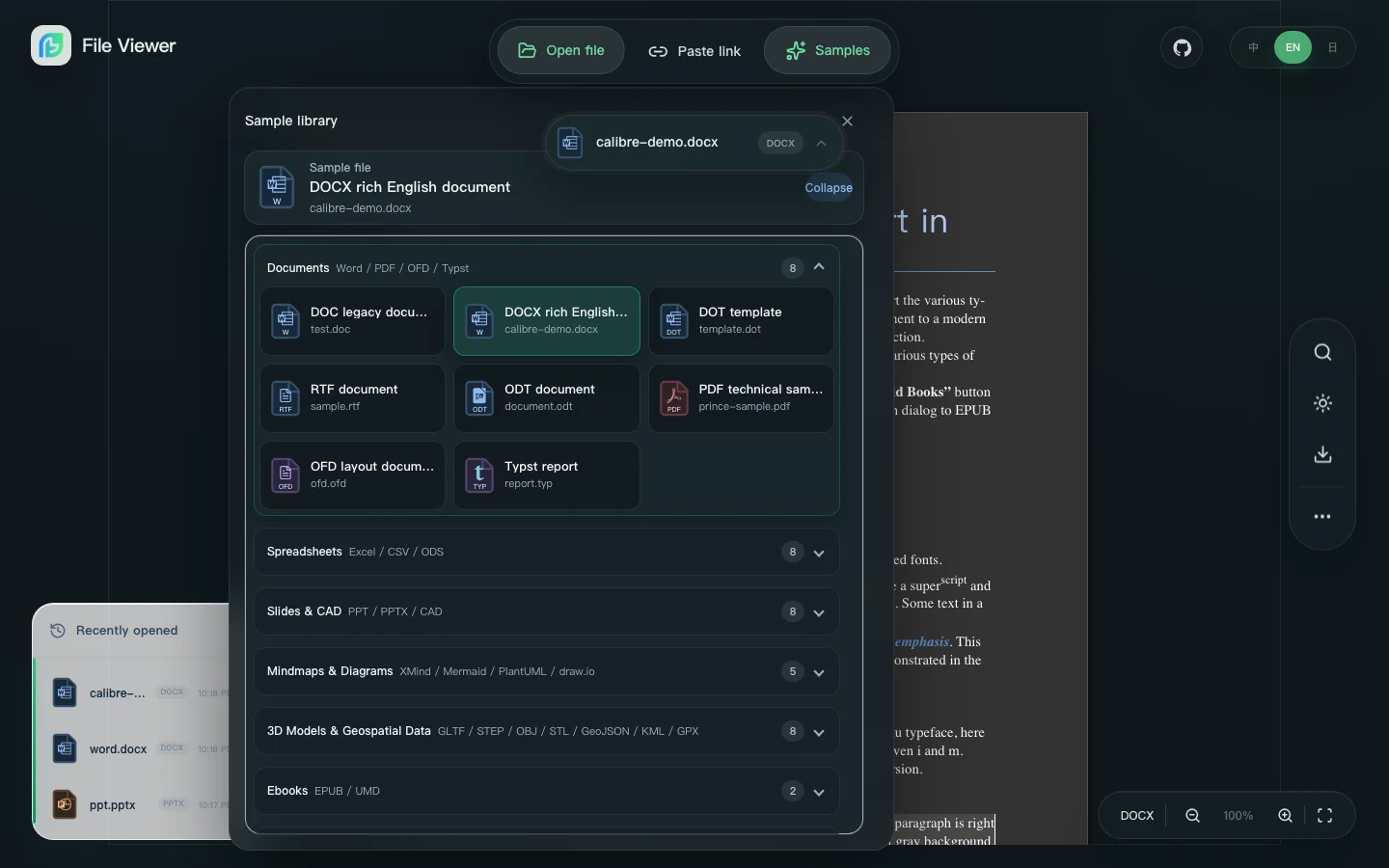
  <img src="/_media/file-viewer-demo-v2.2.6-samples-en.webp" alt="File Viewer by Flyfish v2.3.0 English dark sample library with format-specific file icons" width="1440" height="900" loading="lazy" />

  <p className="doc-caption">
    The sample library opens next to the active source, expands one group at a time, and uses coordinated dark-mode icon palettes instead of filtering light assets.
  </p>
</div>

## Demo File Handoff Protocol [#demo-file-handoff-protocol]

The main demo and iframe entry share the same file handoff protocol. Prefer `/iframe.html` for customer systems: an explicit `url` enters immersive mode, hiding brand, history, and source controls while retaining the document and the active format toolbar. Clean-URL static hosts can also use `/iframe`. Existing systems that already use `/index.html?from=...&name=...` continue to work with the same `postMessage(Blob)` flow.

URL-based iframe:

```html
<iframe
  src="/file-viewer/iframe.html?url=/files/demo.docx"
  style="width:100%;height:720px;border:0"
  allow="fullscreen"
></iframe>
```

Blob handoff:

```html
<iframe
  id="viewer"
  src="/file-viewer/iframe.html?from=https%3A%2F%2Fapp.example.com&name=contract.docx"
></iframe>
<script>
  const file = await fetch('/api/files/contract.docx').then(response => response.blob())
  document.querySelector('#viewer').contentWindow.postMessage(file, 'https://static.example.com')
</script>
```

`from` must match the parent origin. The demo accepts a `Blob` from that origin, wraps it as a `File` with `name`, and renders it. To keep an older main-demo integration, use `/file-viewer/index.html?from=...&name=...` with the same protocol. For customer delivery, use the GitHub Release asset `file-viewer-v2-*-official-demo-iframe.tar.gz`; it includes `iframe-example.html`, `README.iframe.md`, `iframe-manifest.json`, examples, and offline Worker/WASM/vendor assets.

## Local Demo [#local-demo]

```bash
pnpm install
pnpm dev
```

The Vite dev server serves the main demo. Open `/compare.html` on the same host to test side-by-side preview and the jsdiff-powered extracted-text view. DOCX and text files get aligned lines plus character-level additions and removals. PDF work is staged: it follows the PDF text layer, scanned PDFs need OCR, and an incomplete multi-page text layer stops instead of being presented as a complete diff.

## Production Smoke [#production-smoke]

### Reported-Issue Checks [#reported-issue-checks]

Use the same uploaded bytes as the report, not just a similar sample. The regression suite covers hidden XLS search matches, DOC/DOCX text revisions, and page-relative DOCX cover borders on desktop and narrow screens. It also opens real files inside a resizable Element Plus drawer from cold-installed Vue CLI and React full tarballs, without aliases or application-specific Node polyfills.

```sh
# Source-built Demo, including native file upload and HTML page/source switching.
pnpm verify:closed-issue-regressions
# Against the already-built Demo: CAD pixels/print and XLS main-thread/Worker paths.
pnpm verify:issue-245-cad-output
pnpm verify:issue-227-cfb
pnpm verify:issue-204-resize
pnpm verify:mobile-toolbar
# Cold consumer of already-built package tarballs, with the browser assertions.
PACKED_ISSUE_PACKAGE_DIR=/absolute/path/to/candidate-tarballs pnpm verify:issue-consumer
# Actual mobile Safari taps in an already-booted Xcode iPhone Simulator.
CLOSED_ISSUE_DEMO_URL=http://127.0.0.1:4179 pnpm verify:issue-243-ios
```

For HTML, open `page.html` from the sample library and switch between the styled static page and the original source. For DOC/DOCX revisions, use `docx.reviewMode: 'all'`, `'final'`, or `'original'`; this changes the preview, not the source file. A revised paragraph must show genuine deletion/insertion records, without marking unchanged copies of the same text.

The sample library includes `word-revisions.doc` and `word-cover.docx`, copied byte-for-byte from the redistribution-approved reports. In **More > Settings > Formats > Word**, change **DOC / DOCX text revisions**, then apply. The text-format settings also expose the initial HTML view. No application-code edit is needed to compare the modes.

`word-native-revisions.doc` and `word-native-revisions.docx` were created in Microsoft Word for Mac with Track Changes enabled. They cover company-name replacements, unchanged repeated text, mixed bold runs, tabs, soft line breaks, paragraph merges/splits, and table-cell replacements. In `final` mode, `Case join: JOINED` is one paragraph and the deleted soft break is gone. In `original` mode, the original two paragraphs return and the inserted split is removed. The regression fixtures include Word's separately saved Accept All and Reject All reference files and their SHA-256 hashes. These are synthetic samples, not the missing private attachment from #236; they do not claim coverage of all formatting, comment, move, or table-structure revisions.

For OFD, open `ofd-resource-paths.ofd`. It combines a nested document, an alternate XML namespace prefix, and case differences in ZIP paths. Expect `Invoice resource reference` and a black square image. The regression suite also checks resource-XML directories, `BaseLoc`, parent paths, URI encoding, resource priority, and missing nonessential resources. Missing images or font catalogs must not discard readable text; missing required pages, malformed XML, and invalid JBIG2 must finish loading with an error, not a blank success. This constructed sample is not the unavailable original from #57.

For CAD, open `drawing.dxf`, `samples/apache/blocks_and_tables.dwf`, or `samples/autodesk/house.dwfx`. Compare dark-background source mode with black-on-white monochrome, download PNG/JPEG from the CAD toolbar, export HTML, and print to PDF. Check the output pixels, not just the mode label. Output captures the current view/current DWF page; select Fit before exporting the full drawing. Image downloads retain configured text/image watermarks and respect download/export permissions; an unreadable watermark fails explicitly instead of producing an unmarked image.

In a phone-sized host or narrow dialog, the native component toolbar keeps a compact row with Search, zoom and More. Search opens a separate panel; More reveals output actions. Controls must not overlap at 320px or 390px, and a narrow desktop dialog must use its own width rather than the browser width. Wide hosts keep the inline search field. On iPhone, enter a search, close the keyboard, and tap Next again: the host must not stay scrolled beneath Safari's status area. The boot skeleton must not impose `100vh` minimums on the mounted application.

Recent history stays collapsed until requested, so it does not cover worksheet tabs. The column-resize check uses real pointer dragging, switches sheets, zooms in/out, and disables resizing through Demo settings; a changed cursor alone is not a pass.

The MiniFAT check uses a synthetic legacy XLS with an unused invalid MiniFAT pointer, then exercises main-thread and actual Worker parsing through file upload and last-row search. It is not the private #227 attachment. Do not mark that original report verified until the same file is tested privately; damaged required streams must fail clearly rather than silently dropping cells.

After deployment, repeat the Demo checks against `https://demo.file-viewer.app` using `CLOSED_ISSUE_DEMO_URL`. Check `build-info.json` for the expected clean source commit. On iPhone, verify that the visible PDF content moves on Next/Previous and the controls remain reachable; a changed page counter alone is not a pass. Local results and an npm upload are not evidence that the production Demo has been updated.

The repository keeps browser smoke scripts for the demo and component packages:

```bash
pnpm verify:demo-browser-smoke
pnpm verify:demo-sample-click-regression
pnpm verify:component-browser-smoke
pnpm verify:browser-smoke
```

Use these checks before publishing a release that touches renderers, assets, toolbar behavior, search, print, or sample files.
